Options
WinDownload - THE Windows download utility for SmugMug users.
 Dsweet
Registered Users Posts: 81 Big grins
Dsweet
Registered Users Posts: 81 Big grins
WinDownload - "The Windows download utility for SmugMug users." is now available. Same solid functionality as CLDownload, but now with an easy to use GUI. New feature - select individual images!
It hope that people find it as useful and as easy to use as I have.
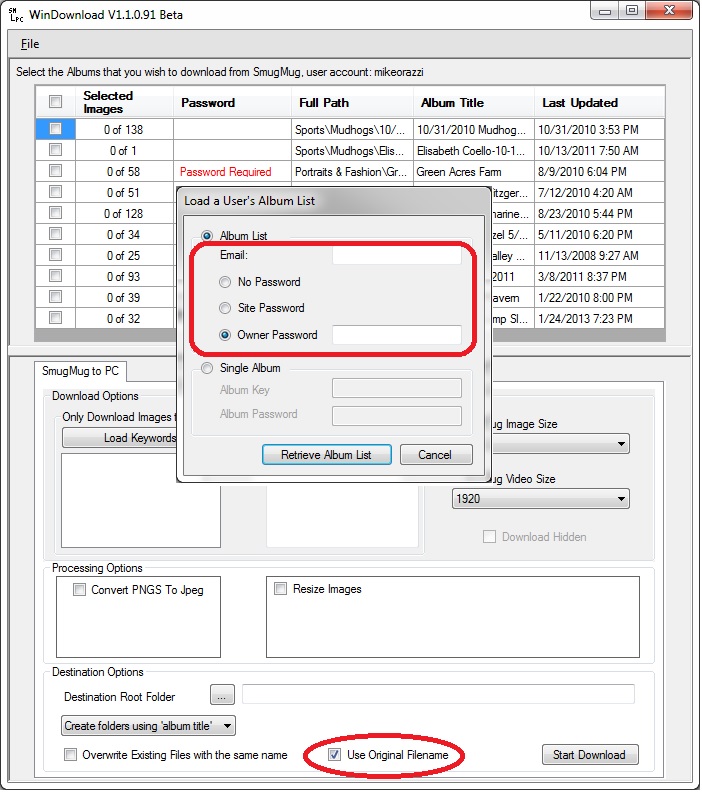
It hope that people find it as useful and as easy to use as I have.
0
Comments
Added the ability to specify the image size and video size to download. Improved validation of Resize dimensions. Improved the documentation.
WinDownload has been well tested. I could not find any bugs and I have downloaded thousands of files for many different users. This is not an alpha or beta. WinDownload is solid!
Added functionality allowing users to select individual images for download.
There were 146 downloads of the software in August, bringing the total to over 250. Two thank you messages and no bugs reported.
How does one put images in the slideshow that are not in a gallery?
galleries. Add the same keyword to all the photos you want in a slideshow no
matter what gallery. Then use the "keyword" to run the slideshow.
My Website index | My Blog
If you are logged in as the owner then all your galleries should be in the WinDownload list.
I am still not sure that I understand the problem. You have a gallery with a title of "Slideshow"? Or are we talking about the slideshow settings source ( as indicated in the screenshot from my last reply)?
Are those galleries right-click protected? If so then they will not show up in the list.
Thanks for the utility. I installed at home, and followed the directions on the install page. I get the "MySmugMugPictures" folder. Everything appears to have worked fine, but I do get a line of text in the error log:"The system cannot find the path specified.".
I opened the program anyway, logged in and I only get the option to download from (4) of my (42) albums. Do you know why all of my albums wouldn't be available for downloading? (after reading above, is it a "right click" thing?)
Thanks in advance,
Paul Stewart
Sorry, I just saw this and smugmug appears to be down at the moment.
I will try to download your album from here and see if I get the same message.
If you log in as an owner, do you see all 42 albums?
I only get 4 galleries in the FotosByStu list and 2 require a password, spot checking the albums they appear to be right-click protected.
As far as the specified path error: Sometimes there is a server hiccup when retrieving images. When this happens, I let the processing complete, close the processing dialog, make sure the "Overwrite Existing Files with the same name" is not checked and click the "start download" button again. Any files that did not download the first time, generally are retrieved on a second pass. If not, please copy the error message and send it to me and I will be glad to look at it.
243 downloads in September, up almost 100 from August, bringing the total to over 500.
Paul Stewart
There were smugmug server issues this morning. I am glad that you got your files.
To answer the question about windownload vs. the new Gallery Download;
The Zip solution works great if you want all your original files from one or two galleries. Windowload may prove more useful than the zip solution if:
1. You want to retrieve a number of pictures, but not all of the pictures, from more than one gallery.
2. You want to easily retain the category/subcategory folder structure instead of having to create a folder for each zip extraction.
3. You are using Vista or Windows 7 and want to retain the metadata: Title, subject and Tags for easy file searching on your PC.
4. You want to use keywords to identify the pictures to download
5. You need a size other than the original size.
6. You want to maximize the size for viewing on an ipad.
7. You want to convert pngs to jpgs.
8. You have a number of galleries to download and want to select the galleries and then go do something else (like go to bed), come back and it is done.
9. You want others to be able to retrieve your pictures without you getting involved in the process.
10. You want instant response with no delays waiting for emails.
11. You want to download only the new files since the last time you downloaded.
12. You want to maintain a backup of all galleries on your PC.
See the end of this message for details on invoking
just-in-time (JIT) debugging instead of this dialog box.
************** Exception Text **************
System.FormatException: Input string was not in a correct format.
at System.Number.StringToNumber(String str, NumberStyles options, NumberBuffer& number, NumberFormatInfo info, Boolean parseDecimal)
at System.Number.ParseDecimal(String value, NumberStyles options, NumberFormatInfo numfmt)
at System.Decimal.Parse(String s)
at h.a(Object A_0, ProgressChangedEventArgs A_1)
************** Loaded Assemblies **************
mscorlib
Assembly Version: 2.0.0.0
Win32 Version: 2.0.50727.4952 (win7RTMGDR.050727-4900)
CodeBase: file:///C:/Windows/Microsoft.NET/Framework64/v2.0.50727/mscorlib.dll
----------------------------------------
WinDownload
Assembly Version: 1.1.0.1
Win32 Version: 1.1.0.1
CodeBase: file:///C:/Program%20Files%20(x86)/WinDownload/WinDownload.exe
----------------------------------------
System.Windows.Forms
Assembly Version: 2.0.0.0
Win32 Version: 2.0.50727.4927 (NetFXspW7.050727-4900)
CodeBase: file:///C:/Windows/assembly/GAC_MSIL/System.Windows.Forms/2.0.0.0__b77a5c561934e089/System.Windows.Forms.dll
----------------------------------------
System
Assembly Version: 2.0.0.0
Win32 Version: 2.0.50727.4927 (NetFXspW7.050727-4900)
CodeBase: file:///C:/Windows/assembly/GAC_MSIL/System/2.0.0.0__b77a5c561934e089/System.dll
----------------------------------------
System.Drawing
Assembly Version: 2.0.0.0
Win32 Version: 2.0.50727.4927 (NetFXspW7.050727-4900)
CodeBase: file:///C:/Windows/assembly/GAC_MSIL/System.Drawing/2.0.0.0__b03f5f7f11d50a3a/System.Drawing.dll
----------------------------------------
System.Xml
Assembly Version: 2.0.0.0
Win32 Version: 2.0.50727.4927 (NetFXspW7.050727-4900)
CodeBase: file:///C:/Windows/assembly/GAC_MSIL/System.Xml/2.0.0.0__b77a5c561934e089/System.Xml.dll
----------------------------------------
SM_1p22
Assembly Version: 1.0.0.1
Win32 Version: 1.0.0.1
CodeBase: file:///C:/Program%20Files%20(x86)/WinDownload/SM_1p22.DLL
----------------------------------------
Accessibility
Assembly Version: 2.0.0.0
Win32 Version: 2.0.50727.4927 (NetFXspW7.050727-4900)
CodeBase: file:///C:/Windows/assembly/GAC_MSIL/Accessibility/2.0.0.0__b03f5f7f11d50a3a/Accessibility.dll
----------------------------------------
System.Configuration
Assembly Version: 2.0.0.0
Win32 Version: 2.0.50727.4927 (NetFXspW7.050727-4900)
CodeBase: file:///C:/Windows/assembly/GAC_MSIL/System.Configuration/2.0.0.0__b03f5f7f11d50a3a/System.Configuration.dll
----------------------------------------
SM_Batch
Assembly Version: 1.0.0.1
Win32 Version: 1.0.0.1
CodeBase: file:///C:/Program%20Files%20(x86)/WinDownload/SM_Batch.DLL
----------------------------------------
System.Core
Assembly Version: 3.5.0.0
Win32 Version: 3.5.30729.4926 built by: NetFXw7
CodeBase: file:///C:/Windows/assembly/GAC_MSIL/System.Core/3.5.0.0__b77a5c561934e089/System.Core.dll
----------------------------------------
ExifUtils
Assembly Version: 1.1.1002.617
Win32 Version: 1.1.1002.617
CodeBase: file:///C:/Program%20Files%20(x86)/WinDownload/ExifUtils.DLL
----------------------------------------
************** JIT Debugging **************
To enable just-in-time (JIT) debugging, the .config file for this
application or computer (machine.config) must have the
jitDebugging value set in the system.windows.forms section.
The application must also be compiled with debugging
enabled.
For example:
When JIT debugging is enabled, any unhandled exception
will be sent to the JIT debugger registered on the computer
rather than be handled by this dialog box.
I gather that you are from Scotland and use "," where we use "." for decimal numbers.
See if this version works. It is a beta.
This version has some additional functionality; Owners can select multiple pictures and galleries and then create a new, destination, "collection" album. The idea being that the collection can be used in conjuction with the new "Tools/Download All" smugmug command to create a zip file containing pictures from multiple galleries.
http://cldownload.50webs.com/WinDownloadInstall_v1.1.09Beta.zip
No, I am in California, USA. The error was occurring each time a picture download was complete. Have you tested it with Win7 64bit and you debugger turned off?
Hi.
Your app is wonderful!
Finally a way to keep an always up to date copy locally of ones Smugmug photos which can then be used in Picasa.
Thank you!
I have two questions / requests:
1) Have you considered two way sync? So if I add a file to a local folder, it will automatically be uploaded to the corresponding Smugmug album? If I create a new folder, it will create a new album using my current default settings in Smugmug. For instance, I have:
/projects/weddings/cust1
...
in Smugmug. Now I download all Smugmug albums and create the corresponding local hierarchical folder structure. So I have:
d:/photos/projects/weddings/cust1
...
I now create locally a new folder:
d:/projects/weddings/cust2
and add files to it.
When I run the app, it will create a new Smugmug album in the category Projects and in the subcat Weddings called cust2.
Now, if I don't have the cats or subcats already, it will create them as well since it can see from the local folder structure what they should be.
This way, I can simply empty my SDcards into my local folders, and they will end up in Smugmug. Next time I sync, I don't have to download them all again since they are already there.
2)
Allow the app to run as a service or at least run a sync every X hours/days/weeks when the app is open. That way I don't have to remember to sync as long as the app is always running.
Having a full blown two-way sync solution for Smugmug would be fantastic!
/Soren
I don't have access to a Win7 64 bit. I will try to find one.
The bug I fixed would have happened everytime a file download was about to start, maybe it is the same bug. Have you tried the beta version?
You have a good thought, and I have considered it.
I have an ipad and what you are proposing is kind of like that sync.
If you are only uploading or syncing from one PC then this is a good solution. Does it get messy when you have multiple PCs? I guess sometimes one would want to just upload, but not sync?
Does there need to be functionality to replace smugmug photos if they are changed?
There is no harm in uploading or downloading. If there is a problem, the user can delete and/or start over. With syncing, I could be replacing files, both on the PC and at the users smugmug account. I don't know if I want that liability.
What do you think?
I have tried the Beta and got the same error.
Thanks.
That surprises me, there are only four places in my code where I parse a decimal. I guess I have to find a 64 bit installation. Is it too much to ask you to try it with the same data set on a 32 bit installation? Do you get it on every gallery you download? Is the gallery a gallery that I can access? It would be nice to know if it is a general problem, not a 64 bit problem, before I head down that path.
We might try it the other way around. If there is a gallery that you know is working, I can give it a try. Also, I can try it in WinXP Compatibility mode (forcing 32bit). I do have other systems to try it for narrowing down variable, but this is my quad-core with extra ram, and I would prefer to get it running here. :-D
OK, pretty much any public album will work... how about
nickname: cmac, no password required.
Pick the first album, path: Other\SmugShots
there are 29 files in that album.
I changed the filesize to medium rather than original.
I selected "no video", since there were a couple videos and I didn't want to wait for them.
All 27 downloaded, no errors. I am using win 7 , 32 bit.
Let me know how it goes for you.
OK, that worked fine. One difference is that I am using the "Single Album" feature (with a password).
I backup all mu Smugmug Gallery with windownload to my hard drive
As a test I uploaded some files back up to a test folder in my Smugmug gallery and Smugmug rejects them as invalid unrecognizable file format
Bummer !!!
Also they are renumbered ie windownload puts 9 digits with underscore in front of the file name
DEspite using the setting original file the downloaded files are not usable by Smugmug..
The jpegs will need re-numbering and repairing
Dont use Windownload
USe a free Firefox plugin to transfer files from Smugmug to your computer for backup it works well and files are ORIGINAL