Options
Weekly Assignment #137: The Men Who Stare At...
 Nikolai
Registered Users Posts: 19,035 Major grins
Nikolai
Registered Users Posts: 19,035 Major grins
The idea is to mimic the poster of the movie "The Men Who Stare at Goats":
http://www.filmofilia.com/wp-content/uploads/2009/10/The-Men-Who-Stare-At-Goats-Photo.jpg
Your entry image should include at least two profiles of the human beings complete with the profile of the "target" that can be anything you want to put there: car, computer, iphone, tree, coffee mug, etc.
It can be a single image or a composite (like an original poster), in which case please also provide the original images that got into the final entry.
This is a rather technical entry, since it requires side lighting and certain photoediting skills, but I'm sure you guys can do it!:thumb
Let get them stare!
http://www.filmofilia.com/wp-content/uploads/2009/10/The-Men-Who-Stare-At-Goats-Photo.jpg
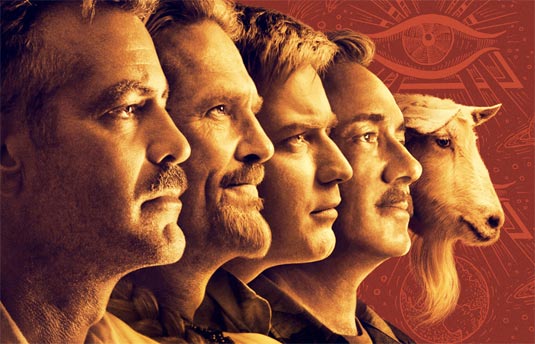
Your entry image should include at least two profiles of the human beings complete with the profile of the "target" that can be anything you want to put there: car, computer, iphone, tree, coffee mug, etc.
It can be a single image or a composite (like an original poster), in which case please also provide the original images that got into the final entry.
This is a rather technical entry, since it requires side lighting and certain photoediting skills, but I'm sure you guys can do it!:thumb
Let get them stare!
"May the f/stop be with you!"
0
Comments
This is still a work in progress, not a final image.
I know the edges around the faces are not *fuzzy* enough to look perfect but I'm having trouble getting that just right in PS Elements.
Try green/blue/any solid color BG for each individual profile
Thanks Nikolai.
Here's one of the originals. Is this what you meant by a green background? It's just a sheet of florescent green poster board.
Maybe I'm not using the layer correctly in PS. I'm using the Magic wand tool to select the green background. I mess with the tolerance so that it gets most of the green at the borders of the skin. I then inverse the selection and copy and paste the person into the new image. I then have to go back and clean up the edges. Is there another way?
Thanks
Yes, this is the green screen technique. But instead of magic wand try color range selection. And make sure your subject is far enough from the BG, so there is no "backlighting".